Posts

HUD Widget

Image
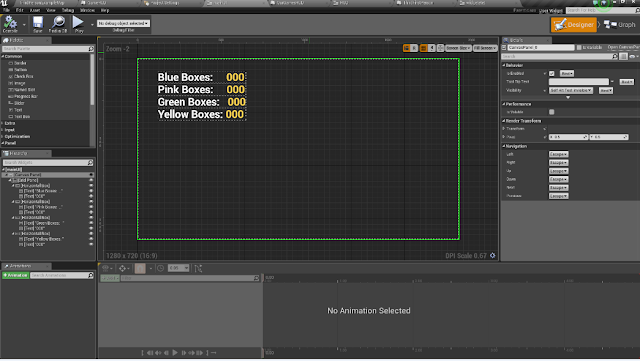
The HUD widget in Unreal 4 is versatile allowing you to quickly make bars and meters that are controlled by scripts in an understandable manner. Customising the look of these bars and meters is also easy. Allowing you to set empty and full states by inserting images of the respective different states which the engine will then use these as a reference to fill the bar or meter up. You can also adjust how the bar fills up with the bar fill type. These HUD elements can also be moved around freely at any point. The Hud widget also supports animation allowing images and texts to have motion keyframed in such as text flying upward and fading slowly out.

Blueprint Clean Up

Image
After returning to my project after a brief break from Blueprinting I have realised just how messy the blueprints of my project have gotten. As a result I have combed through my Blueprints and used the reroute node to make it easier to read and edit as need be. Like the overall file management clean up I did in December I will be attempting to keep this level of order throughout the project to avoid wasted time.

Game Engine Overview

Game Engines serve as the core foundation of a game. The engine handles the interfacing with the hardware it is running on, how to receive input from controller hardware, holds files all different kinds and sizes, allows 3D to be drawn into the world, recreates physics and allows the programming to interact with the game. Most AAA publishers have their own in-house engine(s) specifically built for the type of games they make. No engine is built the same with their own nuanced technical proficiencies and weaknesses. DICEs Frostbite engine was built mainly for large scale high fidelity FPS multiplayer games but struggled when tasked with creating an RPG game in the form of Dragon Age: Inquisition and Mass Effect: Andromeda as the engine was not built with the tools to support the mechanics and logic of that genre and the developers had to spend a lot of time creating these basic systems from scratch. Creating a good 3D engine from scratch is a herculean task requiring a vast a...

RE Engine

Image
RE Engine is Capcoms proprietary game engine originally built for Resident Evil 7. Games engines usually result in a trade-off between visuals and game performance as high-fidelity visuals typically use a greater amount of hardware’s performance resources such as the CPU and GPU with the usage of these resources usually proportional to the quality of the visuals and scope of the game. One of the aspects of a game engines utility is to optimise the techniques they use to minimise the hardware resources used by the game functions and visuals. The RE Engine currently supports 3 of the core platforms, PC, PS4 and Xbox One. Resident Evil 7 has PlayStation VR support for PlayStation 4. High frame rates for VR is a must to prevent the player from feeling motion sick, reaching high frame rates with high fidelity photorealistic visuals is fairly difficult on consoles due to their restricted old hardware. This is where the RE Engine seems to excel with Resident Evil featuring high fidelity ...

Weapon Combos

Image
I have created a weapon combo system. If the player presses the attack button 3 times they will do a series of attacks. The attack that plays will also differ depending on what mode the player is in (sword and shield/ greatsword mode). I have sped up the speed of the switching animation as I felt it was too slow before as the player was stuck still whilst watching a long animation to do so. The camera also shakes after the third blow to give it more impact, which is done by placing a notify in the animation montage. These notifies are used heavily to make the game know when the player is swinging the sword and when they are not. Without carefully placing these notifies the attacks will glitch out and play over one another. Currently the character slides backwards after the Sword and Shield combo, this is easily fixed as its simply because the animation I used is not rooted. All I need to do is get a rooted animation from mixamo, and if it doesn't have a rooted varaint I will j...

Weapon Switch Animation

Image
During the tutorial I am following the video asks me to use a greatsword walk animation downloaded from Mixamo. However the animation file used is not rooted, so they use the Unreal root animation function, however this adds a slight wobble to the character as he walks which looks rather silly. I know that Mixamo has an in built root function within it that works a whole lot better. This was my first time importing animations myself without using a pre-set asset file and it unfortunately went wrong. When imported the file seems to have issues with the skeleton and the end result is this warped nightmare. This was a simple issue of the model I was using used a different rig to another. I now have a weapon switch function which changes the animations of  the character as well as slowing the character down when the greatsword is equipped. 

Gameplay Update 1

Image
I have yet to record my progress of the functionality of the project onto this blog. So before I proceed further into development I have documented all the features I have worked on so far. Which are showcased in this video Currently I have 2 playable characters: a ranged mage type character and a melee knight character. Each has their own abilities, the mage character can heal themselves and throw a fireball and the melee character can swing their sword once and kick. All of these abilities are governed by both the characters mana (the blue bar) and each ability also has their own separate cooldown before it can be used again, these are represented by icons at the bottom that fill up depending on if they can be used or not. Both health and mana replenish naturally over time and there are also pick-ups that the player can walk over that give instant health or mana. There is also controller support which I intend to be the main way to play. The mage character can hit the manne...